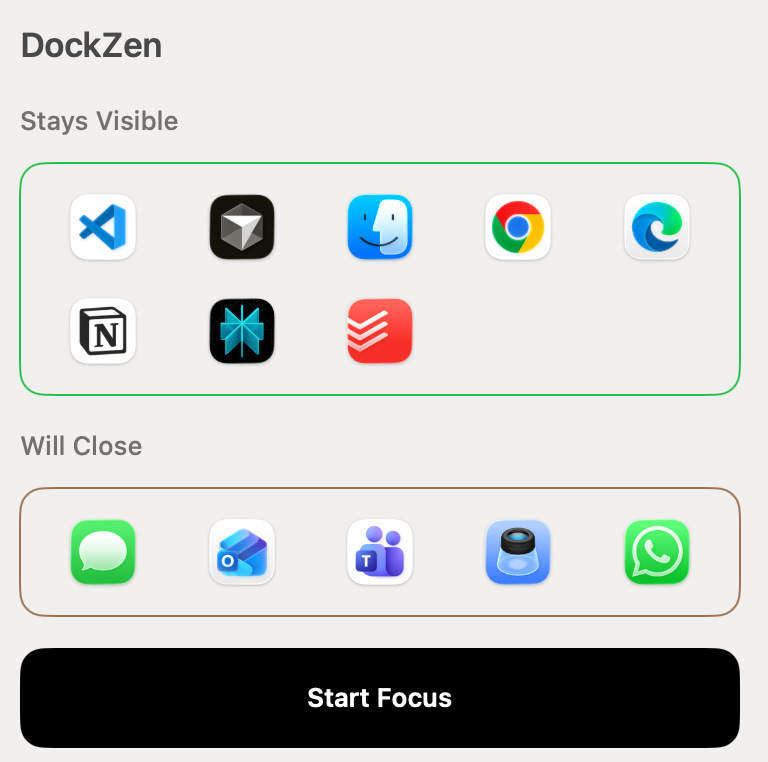
The one-click, macOS-native tool to remove distractions and keep your Dock clean.
Why DockZen?
When you’re in a flow state, you need your environment to match your mindset—not cluttered, not noisy, just focused. DockZen lets you pick only the apps you want for deep work and hides everything else from your Mac dock instantly.
Features
One-click “Start Focus”: Hide all apps from your dock except your chosen essentials.
Easy Refocus: Restore your work dock with another click.
Universal Compatibility: Works with any of your Mac apps including VS Code, Chrome, Notion, and Word.
Mac-native and lightweight: No replacement dock or heavy background processes.
No distractions: Just your workflow, visible in the Mac dock.
Apple authorized: DockZen is notarized by Apple, has no background bloat, and can be easily uninstalled at any time.
How DockZen Works
DockZen leverages the existing Apple dock—no replacements, no hacks. Select your allowed-apps list from the currently open apps. Hit “Start Focus” and DockZen instantly removes all unneeded apps, giving you a minimal dock for deep concentration.
Frequently Asked Questions
Does DockZen replace my dock?
No, DockZen works with your current macOS dock. It simply closes and removes app per your chosen allowed list.
Can I use DockZen for deep work, minimal setups, or presentations?
Yes—DockZen is designed for any focus-driven workflow, including deep work, screen sharing, or presentations.
Will DockZen prompt me if an app has unsaved work?
Yes—when DockZen closes an app, macOS will display the standard system prompt for any unsaved work. You’ll have the chance to review, save, or cancel before anything is closed, so your work is always protected.
Is DockZen safe for my Mac?
Absolutely! DockZen is notarized by Apple, has no background bloat, and can be easily uninstalled at any time.
Why this exists
I am a product leader at Microsoft who loves to build apps that solve real problems. I wanted a simple way to avoid dock clutter when I’m in a flow state.
Instead of willpower, I change the environment. DockZen does that for me.
How to install
download the app
move it to Applications
enjoy your flow
Thanks for trying it.
Focus well.